Image Orientation
The letters drawn at the edges of a view
DICOM image viewers indicate which anatomical direction lies outside each edge of the image using one or more uppercase letters drawn at the top-center and left-center of the view. They let you recognize the patient’s left vs. right (or dorsal vs. ventral, etc.) at a glance, without having to scroll the metadata.
The exact set of letters depends on the Anatomical Orientation Type (0010,2210) attribute of the study — Weasis supports both the standard BIPED scheme used for human imaging and the QUADRUPED scheme used in veterinary imaging.
BIPED (human imaging)
Used when the Anatomical Orientation Type attribute is absent or set to BIPED:
| Axis | Letters |
|---|---|
| Left / Right | L = Left, R = Right |
| Anterior / Posterior | A = Anterior, P = Posterior |
| Head / Foot | H = Head, F = Foot |
QUADRUPED (veterinary imaging)
Used when the Anatomical Orientation Type attribute is set to QUADRUPED, supported since v4.1.0. The scheme uses two-letter codes for left and right (LE / RT) to avoid collisions with single-letter codes that mean something different in this scheme:
| Axis / direction | Letters |
|---|---|
| Left / Right (body sides) | LE = Left, RT = Right |
| Dorsal / Ventral | D = Dorsal, V = Ventral |
| Cranial / Caudal | CR = Cranial, CD = Caudal |
| Rostral (head) | R = Rostral |
| Medial / Lateral (relative) | M = Medial, L = Lateral |
| Proximal / Distal (limbs) | PR = Proximal, DI = Distal |
| Palmar / Plantar (paws) | PA = Palmar, PL = Plantar |
On a QUADRUPED study, R means Rostral and L means Lateral — not Right and Left. Always check the anatomical-orientation type before interpreting single letters.
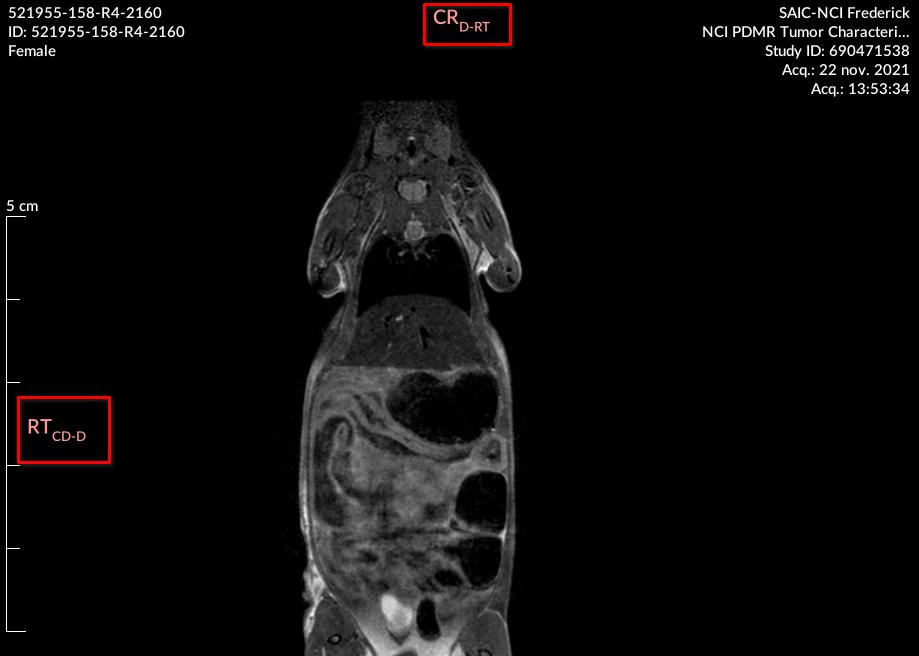
When the view is not perfectly aligned with the three axes of the patient frame of reference, Weasis appends a secondary and tertiary orientation in subscript, separated by - (e.g. A-L-H for an oblique anterior-leaning view).
For projection modalities such as CR or DX, the orientation comes from the Patient Orientation (0020,0020) attribute. It is not updated when the image is rotated, because the orientation cannot be re-derived dynamically from the pixel data.
For cross-sectional modalities such as CT and MR, the orientation is recomputed dynamically and remains correct after rotations, flips, and reformats.
To show or hide the orientation overlay, toggle DICOM Annotations > Orientation in the Display panel on the right.
Orientation in multiplanar reconstruction (MPR)
In the MPR viewer, the same letter convention is applied to each of the three reformatted planes. The uppercase letter at the left or the top names the anatomical direction; the plane type (axial, coronal, or sagittal) is labeled at the bottom of the view.
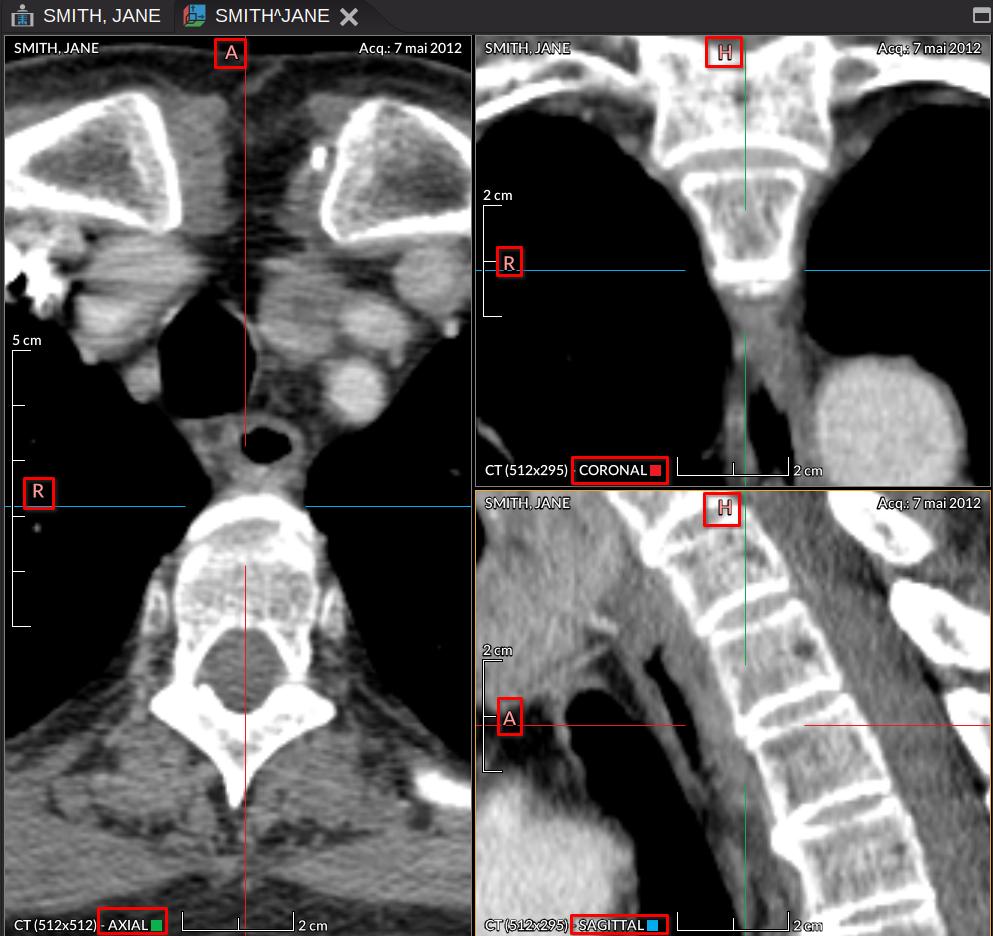
The crosshair axes follow the color coding defined in the DICOM Patient Orientation standard:
- Blue — left / right axis.
- Red — anterior / posterior axis.
- Green — foot / head axis.
The small colored square shown in each MPR view corresponds to the axis that is perpendicular to that plane.