3D Cursor
3D cursor (crosshair)
The 3D cursor — also called the crosshair — lets you click a point on one image and instantly see the same anatomical point in every other view that shares the same 3D coordinate system. Use it to:
- Localize a finding on one modality (for example a CT lesion) on the matching PET, MR, or follow-up acquisition.
- Cross-check structures between axial, coronal, sagittal and oblique planes.
- Compare the same anatomical level on prior and current studies opened side by side.
Two views are linked by the crosshair when they share the same Frame of Reference UID — DICOM’s way of declaring that those series live in the same 3D coordinate system. See Frame of Reference: the shared coordinate system for the full explanation and the typical cases where it applies. Weasis discovers the link automatically from the DICOM metadata — no manual configuration is needed.
Opening related series together
The fastest way to load several series that share a coordinate system:
- In the DICOM Explorer, right-click a series and choose Select related Series. Weasis selects every series in the study that shares the same Frame of Reference UID.
- Right-click the selection again and choose 2D Viewer > Open to display them side by side.
Activating the crosshair
Select the crosshair as the active mouse-button action either from the toolbar mouse-button menus or from any view’s right-click context menu. Once active, left-click anywhere in a view and the marker jumps to the matching 3D point in every linked view simultaneously.
Tip
You don’t have to leave crosshair mode to adjust the image: hold Ctrl while dragging to change Window / Level without switching tools. See keyboard shortcuts for the full list of modifiers (most are customizable since v4.7.0).
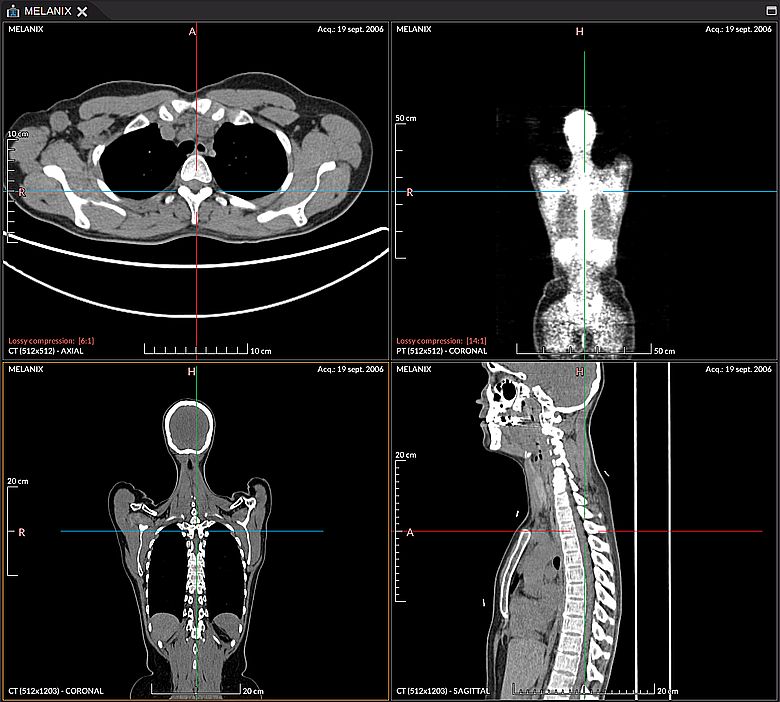
Try it on a multi-series sample
Info
The crosshair is the position-coupling part of a broader synchronization system. For action coupling (Scroll, Pan, Zoom, Window / Level…) between views sharing a Frame of Reference, see View Synchronization.
Info
For the conventions used to label anatomical directions in multiplanar views, see MPR orientation.
Preferences
The 3D cursor shares two display preferences with the MPR viewer:
- Auto-center axes — recenter the views on the clicked point.
- Crosshair gap at the center — width of the blank gap around the click point, so the marker does not occlude the structure being inspected.
Both are configured in the MPR preferences.