DICOM SR Viewer
Displaying DICOM Structured Report
A DICOM Structured Report (SR) carries structured findings — measurements, observations, classifications, and references back to the images they were derived from — as a hierarchical tree of content items rather than free-form text. SRs are produced by radiology reporting systems, ultrasound machines, CAD applications, and increasingly by AI inference frameworks that need to expose machine-readable results.
Weasis renders the SR tree on the right and the image referenced by the currently selected item on the left, so you can read a finding and inspect the underlying image at the same time.
Try to open sample SR files
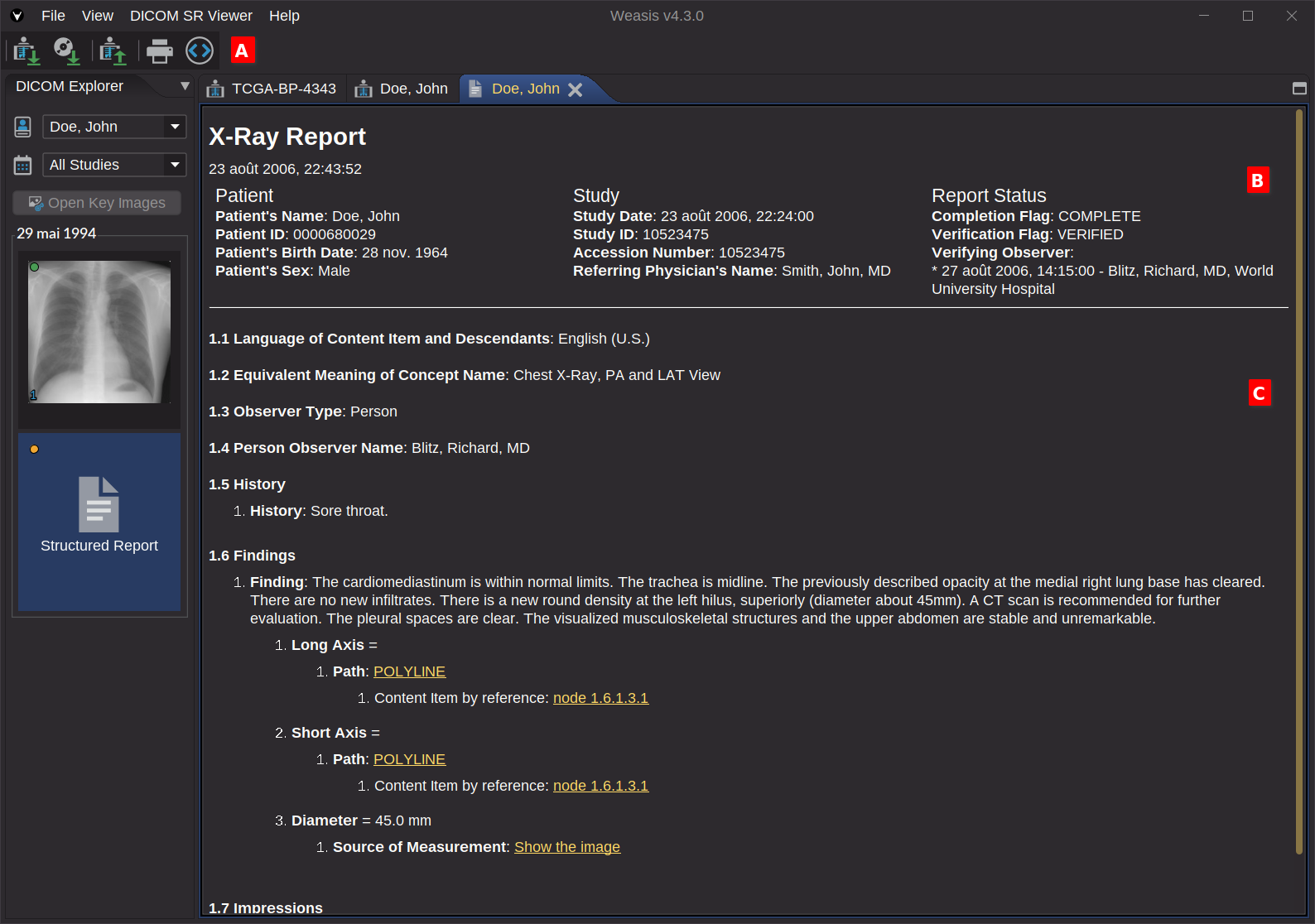
Toolbar A
Actions in the toolbar:
- Print — print the rendered SR.
- Show DICOM metadata — open the full DICOM attributes of the SR object.
Display SR Header B
The SR header is displayed as a three-column table summarizing the patient identification, the study context, and the report status (e.g. Partial, Complete, Verified, Cancelled).
DICOM SR Tree C
The content of the SR is displayed as a hierarchical tree. Each node is a content item with its own number, a concept name (what the item describes — e.g. Finding Site, Length, CAD Output) and a value (text, code, numeric measurement, date/time, image reference, or composite reference). The hierarchy and the inter-item links mirror the relationships defined in the SR object — typically following one of the standard DICOM templates (TIDs) used in radiology, ultrasound, or AI reporting.
Some items also carry a link to a referenced image or region. Clicking such a link opens the corresponding image in the 2D viewer and, when the SR contains coordinate data, draws the referenced geometry on top of it (for example, clicking the POLYLINE node in the screenshot above opens the source image and displays the polyline measurement at its recorded position).
Weasis renders the standard SR graphic types — POINT, MULTIPOINT, POLYLINE, CIRCLE, ELLIPSE — and, since v4.7.0, a subset of the SR compound graphic types — MULTILINE, RULER, ARROW, RECTANGLE — for richer overlays carried by the SR Compound Graphic module.