DICOM ECG Viewer
Displaying electrocardiography data
The ECG viewer displays and analyzes electrocardiogram waveforms stored as DICOM Waveform objects — resting and stress 12-lead ECGs, ambulatory recordings, and rhythm strips. It also provides simple on-screen calipers for measuring intervals and amplitudes, with support for the common lead layouts (12-lead, 3-lead, rhythm strip).
Try to open an ECG sample
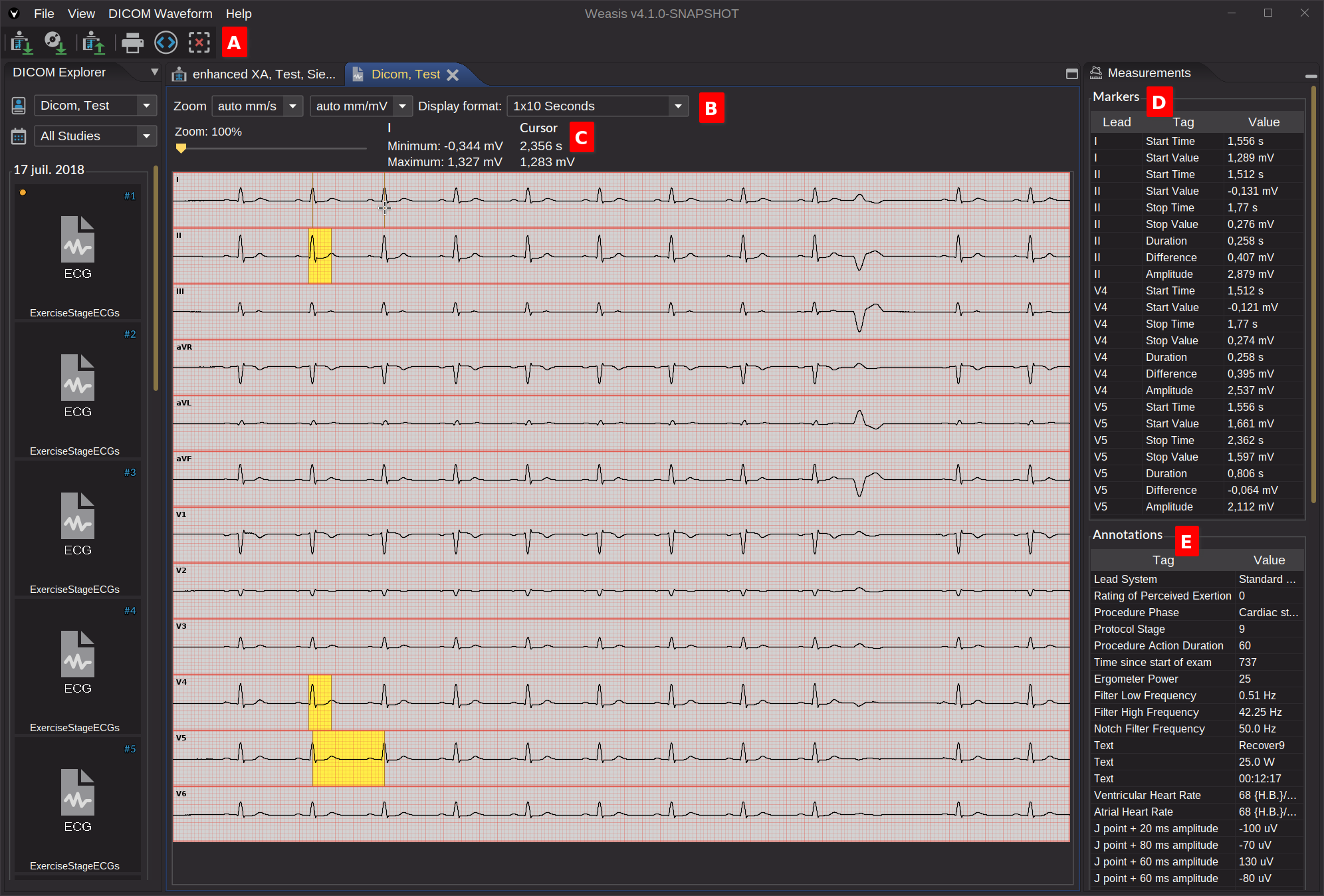
Toolbar A
Actions in the toolbar are:
- Print the ECG as displayed, with basic patient and study identification.
- Show DICOM metadata of the waveform object — opens the full DICOM attributes.
- Clear all measurements (the yellow caliper bands in the image above), see Markers.
Zoom and Display Format B
Three controls govern how the traces are drawn:
- Time scale (X-axis) — millimeters per second; defaults to auto mm/s, which fits the recording to the available width.
- Voltage scale (Y-axis) — millimeters per millivolt; defaults to auto mm/mV, which fits the dynamic range vertically.
- Aspect-preserving zoom slider — scales both axes together so the visual aspect ratio is preserved.
The Display Format menu chooses the lead layout (e.g. 12 × 1, 6 × 2, 3 × 4 + rhythm strip), independent of the zoom.
Lead and Cursor information C
Moving the cursor over the traces updates two readouts:
- Lead label — minimum and maximum voltage observed on that lead across the whole recording.
- Cursor readout — time and voltage at the cursor position.
Markers D
Markers are on-screen calipers (yellow bands above) defined by a start and an end point on the same lead. Each marker reports:
| Field | Meaning |
|---|---|
| Start Time | Time in seconds at the first point |
| Start Value | Voltage in millivolts at the first point |
| Stop Time | Time in seconds at the second point |
| Stop Value | Voltage in millivolts at the second point |
| Duration | Elapsed time between the two points |
| Difference | Signed voltage difference (Stop Value − Start Value) |
| Amplitude | Maximum voltage variation observed between the two points |
Mouse actions:
- Add a start point — click
- Add an end point — Ctrl + click, or right-click
- Delete the measurement on a lead — middle-click, or Shift + click
- Delete every measurement — the toolbar button above
Note
Only one measurement can be active per lead. Placing a new start point on a lead that already has one replaces it.
Annotations E
The annotations panel surfaces two related groups of DICOM metadata stored with the waveform:
- Acquisition Context — conditions present during recording (patient state, electrode placement, device settings, etc.).
- Waveform Annotations — measurements, classifications, regions of interest, or events that may affect interpretation (for example, the timestamp at which the subject coughed or moved).