This page describes a feature that does not exist in the Weasis version selected in the sidebar.
Curved MPR (CPR) Viewer
Reformatting a volume along a drawn path
Curved Multi-Planar Reconstruction reformats a volume along a path you draw, instead of along a flat plane. From a single curve, Weasis produces two complementary results:
- a panoramic view — the volume “straightened” along the curve and shown as a 2D cell inside the MPR container (the dental panoramic / OPG use case);
- a cross-sectional series — a stack of slabs cut perpendicular to the curve, opened as a real DICOM series in a new viewer tab (the dental cross-cuts use case).
The typical input is a dental CBCT (cone-beam CT): trace the dental arch on the axial plane to obtain a panoramic reconstruction and the perpendicular cross-cuts used for implant planning.
Curved MPR is available since v4.7.1.
There is no dedicated drawing tool and no toolbar button. The curve is an ordinary polyline — the standard measurement graphic. Both actions need a polyline with at least 2 points.
Workflow
- Open a volume in the MPR viewer.
- On the plane that best shows the structure to follow — the axial plane for a dental arch, but any plane, oblique included, works — draw a polyline A tracing it (see Measurement and Annotation). Double-click to finish the curve.
- Right-click the completed polyline. The context menu adds two entries:
- Build Panoramic View — generates the straightened panoramic image in place.
- Build Cross-Sectional Slices — opens a dialog and builds the perpendicular cut series.
The polyline is smoothed with a spline before sampling, so a handful of well-placed points along the arch is enough — you do not need a dense set of vertices. Right-clicking a vertex lets you add or delete that specific point.
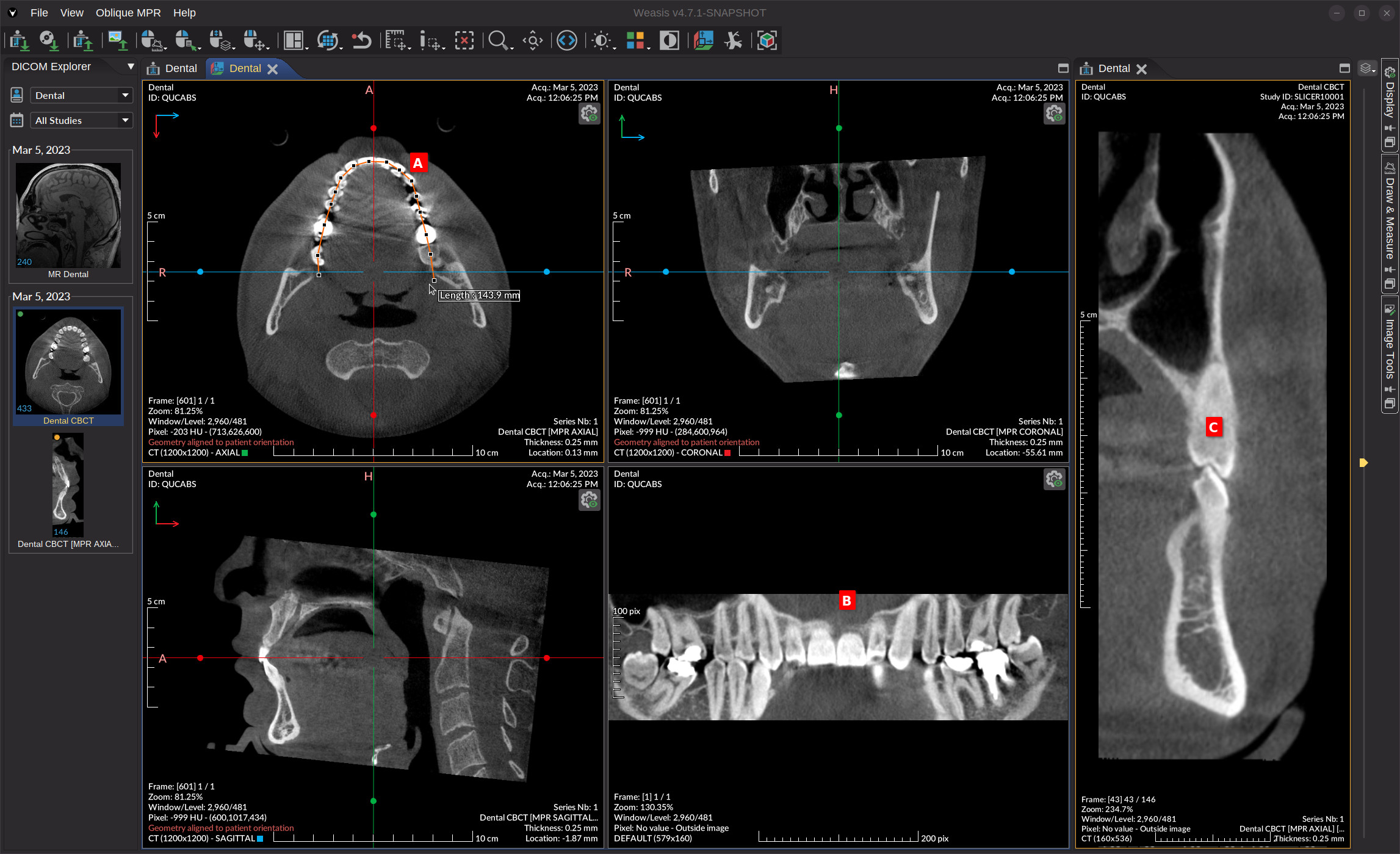
Panoramic view B
Build Panoramic View switches the container to a layout that adds a panoramic cell next to the axial / coronal / sagittal views, and renders the reconstruction there. The panoramic cell inherits the usual window/level, LUT, zoom and pan controls of the DICOM 2D viewer.
The X axis of the panoramic is the arc-length position along the curve; the Y axis is the vertical (Z) extent of the volume. Each pixel samples a single voxel on the curve — a thin curved reformation, like the cross-sections and the MPR views — so the values match the source volume exactly.
Live editing
While the panoramic is open, editing the source polyline (drag, insert, or delete a handle) regenerates the panoramic automatically after a short delay. Removing the polyline detaches the panoramic.
Panoramic settings
Open the settings popup with the icon in the top-right corner of the panoramic cell. It has two live sliders:
- Height — the vertical (Z) extent of the panoramic slab. Default 40 mm.
- Step — the sampling distance along the curve. A smaller step gives a wider, more detailed image at a higher cost; the label shows the resulting sample count (curve length ÷ step). The range is anchored to the volume’s voxel spacing, and the default step matches it (one output row per voxel).
- Reset to defaults — restores both sliders to their initial values.
Both sliders regenerate the image only when released, so dragging stays responsive on large volumes. Values are shown in mm when the source volume is calibrated, and in pix otherwise.
The panoramic image intentionally carries no pixel spacing: its X axis measures arc length along the curve, which is not the Euclidean distance between distant points, so calibrated millimetre measurements would be misleading. Measurements taken on the panoramic therefore report in pixels.
Cross-sectional slices C
Build Cross-Sectional Slices first shows a small dialog to set the slab geometry:
| Parameter | Meaning | Default |
|---|---|---|
| Slab width | extent of each cut perpendicular to the curve | 40 mm |
| Slab height | extent of each cut along the Z axis | full volume height |
| Spacing between cuts | distance between consecutive cuts along the curve | 1 mm |
A Reset to defaults button restores the three values. The unit label follows the source image: mm when calibrated, pix otherwise. Confirm with OK (or Cancel to abort).
Weasis samples the curve at the chosen spacing — one sample is one cut — and assembles the slabs into a real DICOM series. The series is registered under the source study in the DICOM Explorer and opened in a new viewer tab. Unlike the panoramic, the cross-sections are spatially calibrated, so distances and measurements on them are valid.
Limitations
- The curve must lie in one plane: the reconstruction extends it along the normal of the plane it was drawn on. A path that bends out of that plane is not supported.
- The panoramic is a thin curved reformation (one voxel sampled on the curve, no adjustable slab thickness); only Height and Step are adjustable.
- Samples that fall outside the volume are left empty rather than filled with a background value.
- The panoramic is uncalibrated — measure on the cross-sectional series when accurate distances matter.