DICOM Audio Player
Playing DICOM AU data
The DICOM Audio SOP Class (commonly referred to as DICOM AU) stores waveform audio inside a DICOM object. It is most often used for voice annotations dictated by the technologist or radiologist, Doppler ultrasound audio, phonocardiography, and other acoustic signals captured alongside an imaging study.
Weasis opens these objects in a dedicated player launched by double-clicking the audio thumbnail in the DICOM Explorer.
Try to open a DICOM AU sample
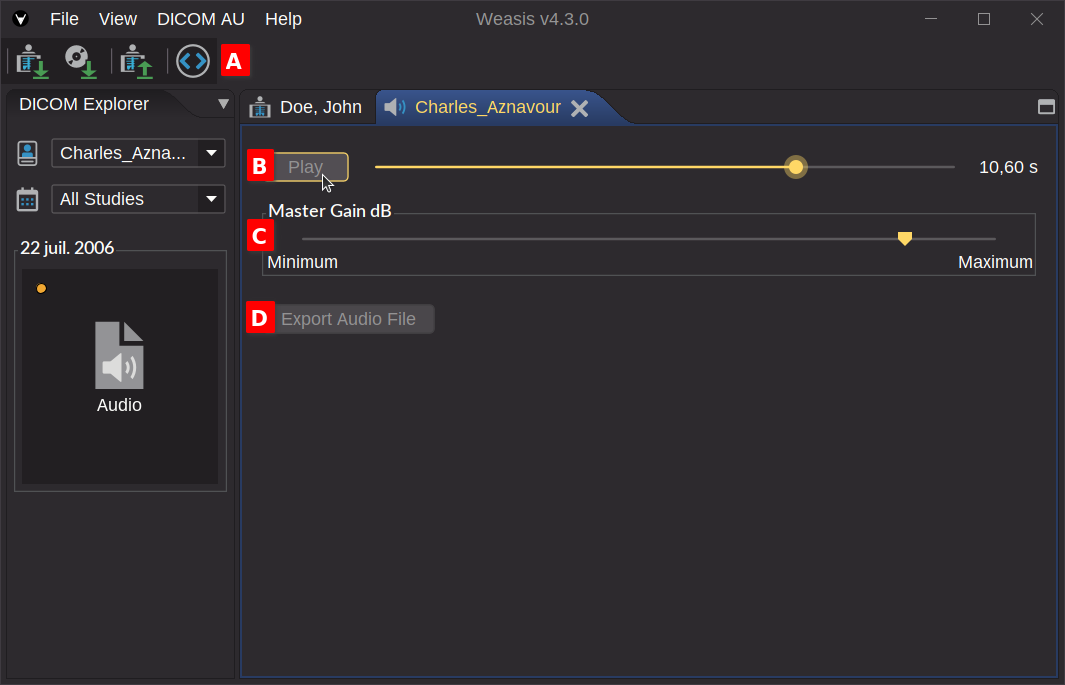
Toolbar A
- Show DICOM metadata — opens the DICOM attributes of the audio object.
Play B
The Play button toggles between playback and pause. The slider lets you scrub through the recording; the current position is displayed in seconds.
Volume C
Adjusts playback volume independently of the system mixer.
Export Audio File D
Saves the embedded waveform to disk as either:
- AU — the format used by the DICOM payload itself, preserved as-is.
- WAVE (.wav) — re-encoded for broad compatibility with consumer audio players and editors.